

Kimomanzi Quality Management System Software
Our Kimomanzi Quality Management Software is what sets us apart from the rest
AND we integrate & coordinate your Quality Management Implementation (ISO 9001) with your Enterprise Resource Planning Software (click to see detail)
Our Kimomanzi Software guides you
from procedure development right through to execution and record keeping:
System Components
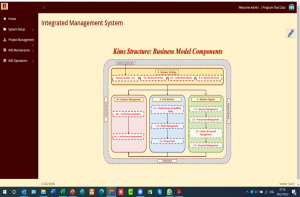
- System Setup: Setting up company profile, user management, document configuration, etc.
-
IMS Maintenance: The 46 procedures and 100+ documents are under this option where you can simply adjust them to suit your requirements.
- IMS Operations: The procedures and documents, as maintained under IMS Maintenance are available here for operational execution and record keeping.
User Management
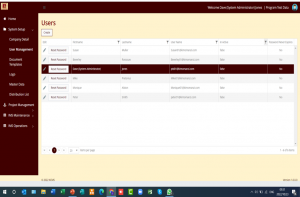
- User Access: This can be managed in detail to only allow users access to what they are authorized to do.
- Type of Access: The type of access users can have to specific functionality can be limited to (or any combination of):
- View
- Edit Masters
- Execute
- Authorize
- Number of Users: The number of users on the system is selected by you and is unlimited.
Implementation Project Management
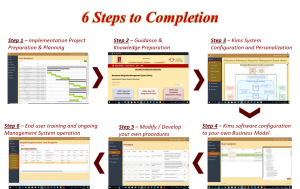
- 6 Easy Steps to Completion:
- Plan your Implementation Project
- Obtain the Required Knowledge
- Personalize the Kims Software to Suit You
- .Configure your IMS structure
- Use the procedure & document templates as basis to develop your own IMS
- Conduct End User training
Procedure Maintenance
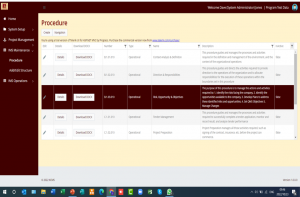
- Management System Structure: The structure to manage and operate your system is already included in the software and ready to use. This structure caters for all aspects of the business, and consists of 4 of the possible 26 categories. You can use the other 22 categories for other divisions, subsidiaries, etc.
- Procedure Templates Included: The 46 procedure templates included covers all the aspects of the business and must merely be tweaked and adjusted to suit your business and operating environment. You also can delete procedures that you don’t need, and add more procedures that you may require.
Procedure Detail
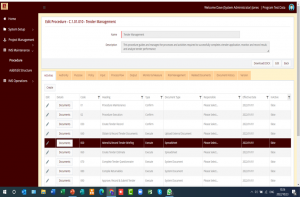
- Easy to create/maintain: All 46 procedures on the Kimomanzi software can be maintained or new ones created by following the simple steps identified by the easy to use tabs that guides you through the process.
- Already populated: The 46 procedure templates on the system are fully populated and all you need to do is change them to suit your own requirements/preferences.
- Easily download/print the procedure document: Once the simple steps to maintain/create the procedures are completed, it is a simple click to download/print the procedure document and attach it to a tender, or for any other reason you may require.
- Link operational documents: The 100+ operational documents (see below) are linked to the individual activities required to execute the procedure. This allows the system to auto-convert the created procedures to online execution (See below).
Operational Execution
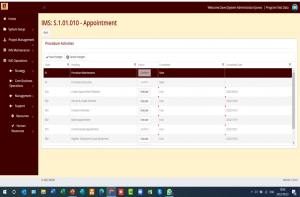
- Easy execution of procedures: The procedures as created under the maintenance function is presented to operational and administrative personnel to merely follow the simple steps to complete their tasks.
- Ensure correct procedure execution: The operational function of the Kimomanzi system will always present the latest documents for execution which limits mistakes from the use of outdated documents.
- Record keeping; Full execution records are stored on the system for all activities that are executed on the system and the system keeps version control that ensures older transactions are reflected in the correct context.
- Easy access; Once a procedure activity is completed on the system it can immediately be viewed/authorized online from anywhere by management (with the correct authority).
Operational Documents
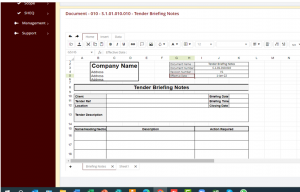
- Document templates: There are 100+ operational documents on the system that you can modify to suit your requirements/preferences.
- Document types;
- Excel compatible: This document type is online and can be downloaded to Excel or Excel spreadsheets can be uploaded directly.
- All Microsoft document types can be used on the system.
- Easy to complete: When executing a procedure activity it is as simple as opening the document, completing it and saving it!!
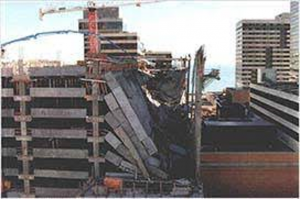
You can even upload pictures for completeness of your Health & Safety accident reporting!!